

Get discovered, gain trust, and be the top choice. Your Google Business Profile (previously known as Google My Business) is an incredibly powerful tool for attracting local customers online. In this guide, we’ll walk you through the steps to set up, verify, and fully optimize your GBP—not just create it.
what does GMB mean?
GBP stands for Google Business Profile, is the new name for Google’s online tool that helps businesses manage their information and presence on Google Search and Maps.
Essentially, GMB and GBP refer to the same platform, serving as an online listing by google, It was rebranded from GMB, which stands for Google My Business, in late 2021 or early 2022.
The transition to Google Business Profile has made it more beginner friendly and made the management easier as it is a crucial asset for business owners, allowing to update their information directly within Google Search and Maps instead of relying on separate different dashboards.
Is Google Business Profile Free?
Absolutely! Setting up and using Google Business Profile (GBP) is completely free. Unlike paid advertisements, GBP serves as an organic SEO tool that, when optimized correctly, can help you land a spot in the Local 3-Pack—the map section that appears above all other search results.

How Does Google My Business Work?
Think of it as your central hub for boosting your local online presence. Google Business Profile allows business owners to claim and verify their listings, giving them control over the information displayed to customers on Google Search and Maps.
What Does Google Business Profile Do?
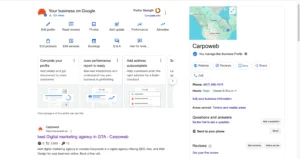
Your Google Business Profile gives you a leg up in local searches by showing your business information right in Google Search and Maps.
So, how does it work? if someone types in “best electrician near me” or “digital agency in Toronto,” Google will cross-reference that search with the details you’ve provided in your GBP. If everything aligns, your business information will pop up!
An optimized Google Business Profile not only makes you more visible in search results but also builds trust and helps your branding. It allows you to showcase your reviews, photos, service details, and contact options exactly where potential customers are looking.
Who Can Get a Google Business Profile?
Pretty much all business that interacts with customers within any specific service or products can qualify.
This includes everything from storefronts and mobile service providers to home-based professionals and even online consultation or a mental health professional who provides therapy services via telephone only.
Why Do I Need a Business Profile?
This tool is one of the most effective ways to attract local traffic to your business, whether online or in person.
that showcases essential information about your business; like your name, physical locations and addresses, phone number, hours of operation, website, photos, and reviews, to help potential customers find and connect with you in local search results.
Plus, it helps customers get to know who you are, what you do, what you’ve accomplished, and how to reach or visit you—all before they even set foot on your website. That’s why having a Google My Business profile (or GBP) is essential!
Google tends to favour active, verified, and optimized profiles in its local algorithm, helping it understand your business better and giving you more local impressions.
What You Need Before You Start
Before you set up your Google Business Profile, make sure you have everything ready:
- a Google account (either Gmail or Workspace)
- your business name (as it appears on your signage and other listings)
- business or personal phone number
- physical address or if you’re a mobile business, your service area.
- It’s also helpful to have a website URL if you have one, your business hours, and a few high-quality photos of your logo, team, and location.
- Getting all this sorted out will help ensure a smooth setup and keep your branding consistent.
How to Use Google Business Profile?
To get started, just log into your Google Business dashboard, keep your information up to date, and engage with the platform by posting updates and interacting with customers.
How to Create a Google Business Profile Step-by-Step:
Step 1: Go to the Right Link
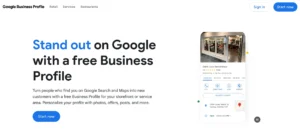
To begin, visit https://www.google.com/business/ and click “Manage now” to start creating your profile.
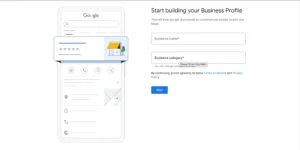
Step 2: Enter Your Business Name
Type your exact business name as it appears in real life—on your storefront or branding materials. Avoid adding keywords like location or services into the name to game the system. Google sees this as spammy and may suspend your profile.
Step 3 : Choose the Right Business Category
If you operate from a physical address, enter it in full. For mobile service providers, select the option to indicate you deliver goods or services and specify your service areas. This step ensures Google places your business correctly on the map and shows it to relevant local searches.
Step 4: Add Your Location or Service Area
Begin typing your business type and select the most relevant match (e.g., Electrician, Photographer, Digital Marketing Agency). You’ll also have the opportunity to add secondary categories later to reflect your additional services, you may use the category which you add when you incorporate a business.
Step 5: Add Contact Details
Input your phone number and website URL, ensuring they match the contact information you use elsewhere online. Consistency in your Name, Address, and Phone Number (NAP) is critical for local SEO. If you don’t have a website yet, Google will offer a basic option, but it’s not ideal for long-term visibility.
Step 6: Verify Your Business
Google provides multiple verification methods. Most businesses will receive a postcard by mail, while others may qualify for verification via phone, text, email, or even video call. If you don’t receive your postcard in 14 days, check your dashboard and request a new one. Verification is essential to unlocking all GBP features.

Is a Google Business Profile really worth it
Absolutely! It comes packed with features that every business owner should know about to gain insights and grow their presence, and when you’re ready to expand your reach, the advertising feature gives you a straightforward way to connect with Google Ads.
Here’s what you can do:
- Present your Business Portfolio: You can easily update your profile with accurate information, add eye-catching photos and videos, and highlight your products and services.
- Build Credibility: Engage with your customers by reading and responding to reviews. This not only builds trust but also shows that you value their feedback. Plus, you can even ask for reviews directly!
- Drive Engagement & Conversions: Make it easy for customers to book appointments, answer their questions, and provide options for them to call or message you directly.
- Stay Top-of-Mind: Keep your audience informed and engaged by sharing timely updates and promotions through posts.
- Measure & Grow: Use performance insights to see how customers discover and interact with your business, helping you refine your strategy.
How to Fully Optimize Your Profile for Local SEO
Creating your profile is just the first step. If you want to climb the local rankings and boost conversions, it’s time to optimize!
Complete Every Field
Make sure your profile is fully filled out. Craft a captivating business description that includes natural keywords, list your accurate business hours (don’t forget about holidays), showcase all your services and products, and add a booking link if you use tools like Calendly or Square. Google loves a complete profile and rewards it with better visibility.
Upload High-Quality Photos
Businesses that feature rich visual content tend to get way more engagement. So, upload a crisp logo, a professional cover photo, and some interior and exterior shots of your location. Don’t forget photos of your team in action and any before/after images if they apply. These visuals help build trust and improve click-through rates.
Collect & Respond to Reviews
Encourage happy customers to leave reviews and make sure to respond to each one—even the not-so-great ones. A thoughtful reply shows you care and helps build public trust. Try to weave in keywords naturally in your responses, as this can also give your SEO a little boost. To make it easier, create a review link using g.page/[yourname]/review and share it.
Post Regular Updates
Utilize the “Posts” section to share news, special offers, blog posts, photos, and events. These updates signal to customers—and Google—that your business is active. Just a heads up, posts expire after 7 days, so keep a consistent weekly schedule.
Add Q&A
Take the initiative to add common customer questions and answers to your GBP. This section not only helps future customers but also lets you control your messaging. For instance: “Do you offer free consultations?” — “Absolutely! We provide free 15-minute Zoom consultations for new clients.”
Track Insights
Your GBP dashboard gives you valuable analytics, like how users found you (branded vs. discovery), the number of phone calls, direction requests, and website clicks. Use these insights to refine your categories, hours, photos, and even to enhance your Google Ads campaigns.
Difference between GMB and SEO
While Google My Business and SEO work together, they each play unique yet complementary roles in helping your business get noticed online.
Google Business Profile is essentially your local business listing; it’s a free tool that allows you to show up on Google Maps and in the local 3-pack of search results.
Its main goal is to boost your local visibility, making it easier for nearby customers to find, call, or visit you without needing to click through to your website and boost local SEO.
On the flip side, Search engine optimization is a more comprehensive strategy aimed at enhancing your website’s visibility in organic traffic (non-paid) search results across all of Google, not just limited to Maps or local packs.
Does Google Business Profile affect SEO?
Combine GBP with SEO To maximize your visibility, your GBP should work alongside a solid SEO services and its strategy. Build consistent citations on reputable directories like Yelp, 411.ca, and Cylex, … And seek out listings in niche directories that match your industry.
Final Thoughts
A fully optimized Google Business Profile is no longer optional—it’s your business’s new homepage in local search. It gives you trust, visibility, and a way to engage customers before they even visit your website. Best of all, it’s free and can deliver ROI multiples better than paid ads when done right.
“A properly optimized GBP can deliver 3x ROI vs. ads alone in local search.”